PHAWAZZZY'S BLOG: security
Showing posts with label security. Show all posts

Monday, June 18

SECURITY: What makes a good antivirus and what are its features?

2:09 PM
SECURITY: What makes a good antivirus and what are its features?
Good Antivirus 

Day by day, the virus and other malware threats are growing even bigger than
anticipated – thereby, it has become vital for any smart device user to stay updated
to steer clear of the dangers. If you are wondering which is the good antivirus to choose,
then you will need to understand its features first. There are several free antivirus software
available in the market today but zeroing-in on the right product that would best-fit your system
 needs is all that matters.
Even before you get started, look for the below-mentioned features that make a good antivirus
program – never get carried away by the claims, and also remember to do sufficient research
on the anti-virus programs.
#Malware Detection & Removal
Any good antivirus program will be able to detect different types of viruses and malware in
compressed or uncompressed form. This should be the first and foremost deciding factor for
your anti-virus program. Besides that, see that your robust antivirus program doesn’t consume
a lot of the system resources. If these qualities match, then the program is a real winner.
#Firewall
Few of the free antivirus programs like Comodo free antivirus, after eradicating all the threats
from a device ensures the continual safety with the help of a powerful firewall. The powerful
firewall helps in keeping away all the incoming threats.
#Auto SandBoxing Technique
An effective anti-virus program provides a secure environment to run files in real time to check
for foul play. The Comodo free antivirus is a perfect example of one such platform that provides
virtual space to run and analyze untrusted, unknown and malicious applications.
Sometimes, this feature is also known by the names ‘virus cleanup’ mode, or ‘virtual sandbox’.
The best part of the feature is that it provides safe removal of the virus from the computer.
#Virus Scan
A good anti-virus program automatically runs virus scan at regular intervals to make sure the
system is safe from all dangers. The virus scan will help spot on all the new threats that sneaked
into your computer bypassing the usual authorisations.
#Identity protection
Identity theft has become common these days. With more and more paper facts getting converted
into digital forms, it has paved the easy access for online thieves to steal the identity of known and unknown personnel. The online criminals make use of this information for their personal gains.
A good antivirus program will safeguard your personal information in the best possible ways. For
instance, it will make sure your system is safe and secure by verifying every time the user inputs
the credit card or banking information online.
#Backup
During bad times, especially when your computer is under attack, it is better to run the backup
without taking any chances. Any good antivirus program will sport this feature by default and will
help you in restoring that backup when all the issues have settled down.
#Email Protection
Emails also carry viruses and malware in the attachments. Even though you might be extra cautious,
an impersonator email can cause the damage to your computer. Sometimes, all it requires to do the
harm is opening without clicking on anything.
In such worse case scenarios, a good antivirus program protects your computer from being the victim
of scans or phishing schemes.
#Social media Protection
More and more people use Facebook or Twitter accounts rigorously on a daily basis. The number of
 times they open and close their accounts on a single day is a matter of debate among research
scholars, today.
So, these actions of a user provide an advantageous platform for hackers to implant viruses and
malware on the computers. The intentions of hackers may vary but they never do any good to the computer user. A good antivirus software will send alerts to the user when a Facebook phishing
scam or a Twitter malicious link has been detected.
CREDITS: COMODO ANTIVIRUS.
CLICK HERE TO DOWNLOAD COMODO ANTIVIRUS 10


Read More

SECURITY: How To Protect Your Android Smartphone from Ransomware

1:48 PM
SECURITY: How To  Protect Your Android Smartphone from Ransomware
Ransomware Attack

In recent times, ransomware attacks are on the rise globally. Hackers are spreading new variants of ransomware to infect smartphones. Not only have we seen an increase in ransomware attacks, but the level of sophistication in those attacks have also increased, as well. In this article, let’s discuss how to protect your Android smartphone from ransomware attacks.
Ransomware: Ransomware is a type of malware usually disguised as useful software. Once entered the computer or smartphone, ransomware prevents or limits users from accessing their device, either by locking the screen of the device or the users’ files for a ransom.

How Ransomware Infects Your Android Phone

Unlike PC-based ransomware which exploits known vulnerabilities in the Windows OS, hackers use phishing scams and other social engineering tactics to trick users into loading the Android ransomware onto their smartphone.
Hackers often disguise the ransomware malware as a useful app. Unwary users download the ransomware malware considering it as a safe app, giving it the necessary permissions on their smartphone. Once installed, ransomware locks down the device making the smartphone inaccessible to the user.
Apart from disguised as a useful app, ransomware can also enter your device through phishing links sent via email, text, or through fake requests to perform system/software updates or add plugins.

How to Prevent Ransomware Attack on Your Android Smartphone

The first and foremost thing that you have to do is to keep your Android device up-to-date. Google’s security updates keep your smartphone safe from all types of threats and malware including ransomware.
Download apps only from trustworthy sources like Google’s official Google Play store. You should
refrain from downloading apps from third-party sources and websites as they are unreliable in terms of security. Most of the sites which let you download apps for free often supply you with insecure apps carrying adware or malware.
Enable Google’s security system (Verify Apps) feature on your Android smartphone which analyzes an app for potential threats before installation. To activate it, Go to your Device Settings, Tap the Accounts–>Google–>Security–>Verify Apps. In ‘Verify Apps’ activate ‘Scan device for security threats’ feature.
Back up your device data either on your computer or a cloud-based service like google drive or a portable USB disk. Backuping will ensure that even if your device gets infected with a ransomware malware, you don’t lose any data. It is also useful in case the hacker threatens to delete your data.
Make sure to check out the app’s rating and reviews before downloading and installing an app on your smartphone. It will help establish the legitimacy of the app and protect you against fake apps which try to mimic the legitimate apps.
You can install Comodo Free Antivirus on your android smartphone. It is one of the leading virus removal tool used by many users across the globe. Apart from essential virus removal feature, it offers other premium features like Real-time protection, Secure Browsing, Secure Wi-Fi, Call Blocking and Remote Command to name a few. Install Comodo Free Mobile Antivirus today and protect your Android smartphone from all types of threats and malware.
CREDITS:COMODO ANTIVIRUS.
Read More

Monday, November 27

strengthen your WhatsApp security with these 8 tricks

2:45 AM
 strengthen your WhatsApp security with these 8 tricks


If you are the type that spend a lot of time  chatting with your  family and friends on WhatsApp, it would be a big problem if someone hacked into your accounts or read your chats, since they could potentially know everything about you.
To avoid getting such an unpleasant surprise, below are 8 easy tricks to  increase the security of your WhatsApp account.

How to boost your WhatsApp security

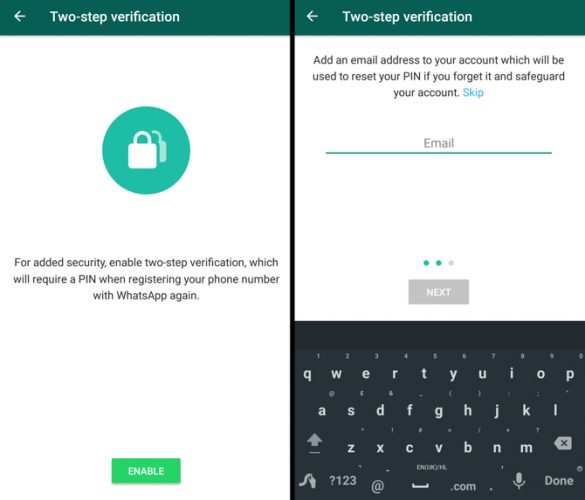
1. Activate two-step verification

Two-step verification adds an extra layer of security.
To activate two-step verification, go to Settings > Account > Two-step Verification > Activate.
Follow the steps to create a six-digit PIN code that is easy for you to remember. You can also add an email address that will receive the code in case you forget it.
From now on, and at random intervals, you’ll see locks that will only be deactivated when you enter the PIN. This way, if someone steals your mobile, thanks to this system, they won’t be able to snoop on your WhatsApp.

2. Get yourself a good lock code

If your mobile is stolen but the thief cannot unlock it, he will not be able to access your WhatsApp (or any other app, of course). Use everything that your mobile can offer you in this regard to prevent someone who is not you  from using it.
It may sound like dumb advice, but you’d be surprised by how many people use, for example, the sequence 1-2-3-4 for their lock code.

3. Disable cloud backup

WhatsApp creates backup copies of your conversations in Google Drive or in iCloud. This way, if you reinstall it, you can recover old messages.
The problem is that this backup is not encrypted. That means there are chances that a hacker could gain access to this copy and read the data.
If you are worried about this possibility, all you have to do is go to Settings > Chats > Backup. There you can select how regularly your conversations will be saved. Choose Never to deactivate it. Remember, however, that this means there will be no way to recover your conversations!

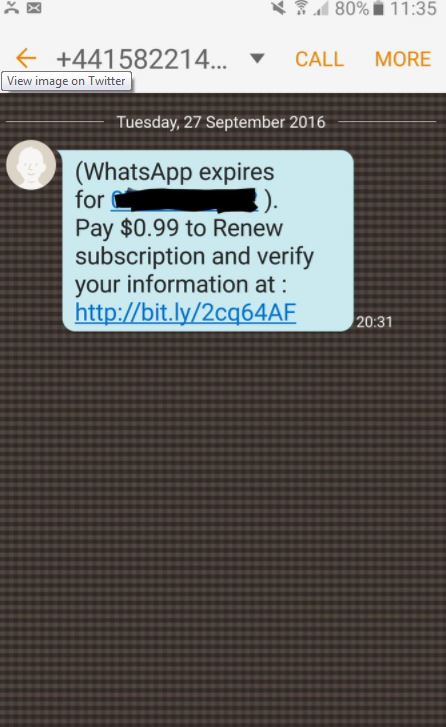
4. Watch out for scams

Every now and then, you’ll receive misleading messages that promise you, for example, access to new colors for WhatsApp or six free months of Netflix. All these messages have been created by cybercriminals who’re trying to steal your private data and access your account or to sell the information to third parties.
The golden rule here is this: DO NOT trust any of these promotional messages. Especially if they are related to WhatsApp. If you have doubts about it, look for information about the message to make sure. A quick Google can go a long way.
This WhatsApp Colors scam is a great example of the type of thing you should be keeping an eye out for.

5. Use the official WhatsApp Web app

There are many unofficial tools with more features than the official WhatsApp Web app. The problem is that these external versions cannot guarantee the same protection and security as WhatsApp Web.
Which do you prefer: some extra features or chatting with confidence?

6. Check out the WhatsApp privacy section

Remember that WhatsApp allows you to block your profile picture to anyone who is not your contact, disable the last time you connected etc.
To access all these options, go to Settings > Account > Privacy.

7. Inspect security codes

When a contact and you initiate a new chat, a security code is created. As long as you both have the same code, your conversations will be secure. If they are different, it means that a third party has secretly accessed your chat.
How can you find out if you have the same code? Comparing. Each of you can see the other’s code.
Select the profile picture of your contact in the chat. Then select Encryption. The code that you get should be the same. If it is different, it means that someone has managed to hack your chat.

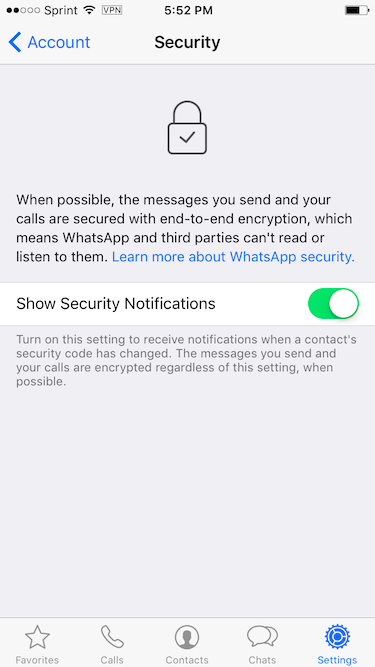
8. Activate security notifications

There is a way to keep on top of when a chat’s security code has changed (that is, to know when your conversation may be in danger) .
You can activate notifications that will alert you each time a code has changed. To do this, go to Settings > Account > Security. Ask your contact to do the same to be 100% covered.
Read More

Tuesday, October 17

Celebrate Avast 2018’s New Features and Win

3:56 AM
Celebrate Avast 2018’s New Features and Win
Avast has just unveiled their 2018 security suite. To celebrate, we’re giving away 100 licenses for Avast Premier. Each license will give full access to Avast Premier’s premium features for one year and is worth $79. Avast Premier comes packed with all of the new features Avast is introducing this year, including the Webcam Shield feature.

How to Enter

1. Follow us on Facebook

Head over to our Facebook page and click like.

2. Stay tuned

On October 9th we’ll launch a question on our Facebook page related to Avast’s new security suite.

3. Leave a comment

You have until October 23rd to leave your answer to the question.
Good luck. Hopefully you’ll be one of the 100 lucky winners who get to take home a year-long license for Avast Premier.
To learn more about Avast 2018’s capabilities, check out our article about all of the updated features.
When the final date of the contest has passed, we’ll notify the winners to tell them how to claim their prize. For the terms and conditions, click here.
Read More

Avast 2018 Is Coming, With 2 Great New Features

3:31 AM
Avast 2018 Is Coming, With 2 Great New Features
Do you have a sticker covering your webcam? Even Mark Zuckerberg has one! These stickers aren’t there for show; they are there because people are worried about who might be watching from the other side of the webcam. People are worried about how their webcam can affect their privacy.

We all have that niggling little fear of what a hacker could do if he was spying on our most private moments. Cyber-criminals could use our private photos and videos to blackmail us or even just harm us by distributing them throughout our social networks.
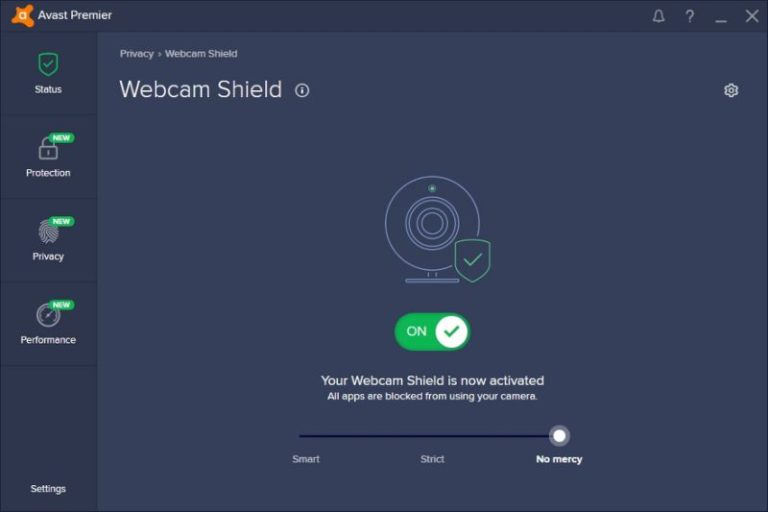
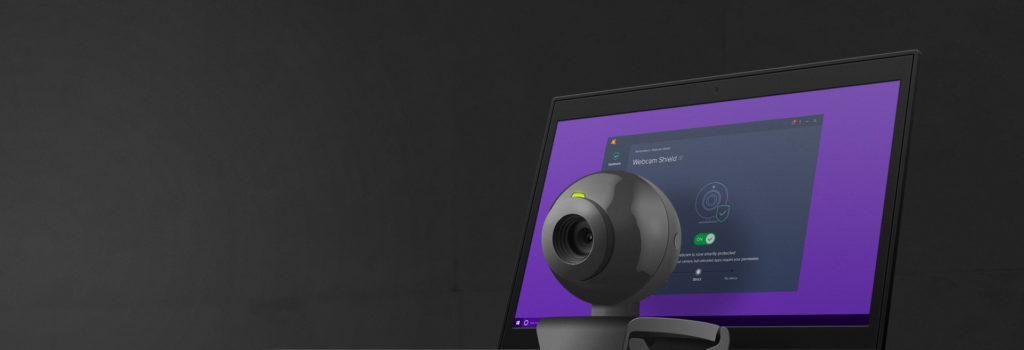
This is something that Avast has moved to address in the forthcoming Avast 2018release, which includes a new Webcam Shield feature.
With Webcam Shield activated, Avast 2018 will only allow trusted apps to access your webcam. If something suspicious takes place, the system will warn you. Avast 2018 gives you total control over your trusted apps whitelist. There is even the nuclear option, which involves disabling the camera so that nobody – not even you – can use it. This, of course, is reversible, in case you decide you want to use the camera again in the future.
You get Webcam Shield with Avast Premier or with Avast’s brand new mega package for 2018: Avast Ultimate.
Avast Ultimate includes all four of Avast’s premium applications (Premier, Cleanup Premium, SecureLine VPN and Password Premium) at a special price. In fact, Avast Ultimate is approximately half the price you’d have to pay if you bought all of the premium applications separately.
Here’s a quick review of the four premium applications included in Avast Ultimate 2018.
Premier beefs up your security. In addition to detecting and removing viruses, ransomware, malware, Trojans, and much more, this anti-everything includes new features like the previously mentioned Webcam Shield, improved real-time protection, a Ransomware Shield, and an improved anti-phishing system.
 
The 2018 version of Avast Cleanup Premium has had a facelift, which makes it easier for you to clean, speed up and fix your beloved computer. It includes a brand-new control panel, which gives you at-a-glance access to the state of your computer and the ability to optimize six critical areas of your PC with a single click. On top of that, you’ll have easy access to the registry, hard disks, browsers, shortcuts and annoying ads or toolbars.
With Avast SecureLine VPN 2018, you’ll have guaranteed safe, private and unrestricted regional navigation no matter where you are. It has an improved and easier to use interface and more servers than ever before. Users of Avast SecureLine 2018 will be able to connect to servers in 53 countries around the world.
As secure passwords are becomingly increasingly complicated, there has never been a better time to start using a password manager. Avast Password Premium 2018 is a password manager you can trust. It will safely and securely store all of your most private information to keep it safe and also use it to automatically fill in web forms when you’re shopping online.
Avast Ultimate is not only a solution designed to say goodbye to the viruses and intrusions you can expect on a typical computer. If you have Avast Ultimate installed on your machine, not only can you forget about being spied on via your webcam; you can also forget about any type of threat that could come from the internet.
Read More

CONNECTING YOUR DEVICES TO A WIFI NETWORK MAY PUT YOU IN TROUBLE AS THE WPA2 HAS BEEN RECENTLY HACKED. CHECK HOW TO PREVENT THIS(recommended)

3:22 AM
CONNECTING YOUR DEVICES TO A WIFI NETWORK MAY PUT YOU IN TROUBLE AS THE WPA2 HAS BEEN RECENTLY HACKED. CHECK HOW TO PREVENT THIS(recommended)
As cyber threats go, they don’t get much bigger than this one
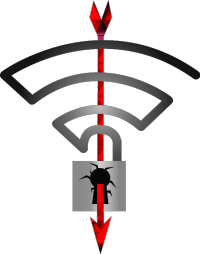
The latest cyber scare to grip the world has hit and it will effect an unprecedented number of users and devices. KRACK targets the WPA2 security protocol, which is the standard Wi-Fi security protocol for all modern Wi-Fi networks. This means that any device that has ever connected to a modern Wi-Fi network will most likely have been effected. If you value your privacy you need to update all of your devices now.

KRACK stands for Key Reinstallation Attack. A researcher at a Belgian university released information on the startling via a special KRACK website:
“This can be abused to steal sensitive information such as credit card numbers, passwords, chat messages, emails, photos, and so on. The attack works against all modern protected Wi-Fi networks. Depending on the network configuration, it is also possible to inject and manipulate data. For example, an attacker might be able to inject ransomware or other malware into websites.”

The vulnerability affects a core encryption protocol. It can trick a user into reinstalling an already-in-use security key. These keys are supposed to be unique and only used once. KRACK can break up the process of creating new keys for every Wi-Fi connection so that old ones can be reused.


Via: Krack Attacks

With this vulnerability affecting almost every device that connects to the internet it has never been more important to take the necessary steps to protect yourself when you’re online. The need for a robust antivirus suite has never been more pronounced. We recently looked at the new features introduced into the Avast Premier 2018 suite and we’ve also teamed up with Avast to give away 100 Premier licenses.
On top installing a strong Antivrus suite, there are a number of steps you should take to protect yourself against a KRACK attack:


How to protect yourself against a KRACK attack

1. Avoid Public Wi-Fi at all costs

2. Use an Ethernet cable, wherever possible, to connect to your internet at home

3. Only connect to secure websites and services that use HTTPS. You’ll see this in the URL.

4. If you use a reputable VPN you should activate it permanently until the vulnerability has been patched

As to when KRACK will be patched, we’ll let you know as soon as we hear anything. In the meantime, this threat needs to be taken seriously as it opens up your devices to hackers of all kinds. We’re not just talking about global cyber criminals here. Local mischiefs could detect your home Wi-Fi network and then exploit the vulnerability.
Read More